Birthday Automation in Active Campaign
- Start by creating fields. This can be done by making a form and adding the following fields. By making the form, it will now allow those fields to be available for every contact in your list.
- Parent’s First Name
- Parent’s Last Name
- Athlete’s First Name
- Parent’s Email
- Athlete’s Date of Birth
- Pull a CSV from your class management software with this information for all your athletes.
Note: This can be tough if you have siblings under the same parent’s account. We selected to only use the older sibling for this as you would need a second email for the parent to make this automation work for each child.
- Import your CSV into your active campaign. I had created the list “Current Members” and added everyone to that particular list.
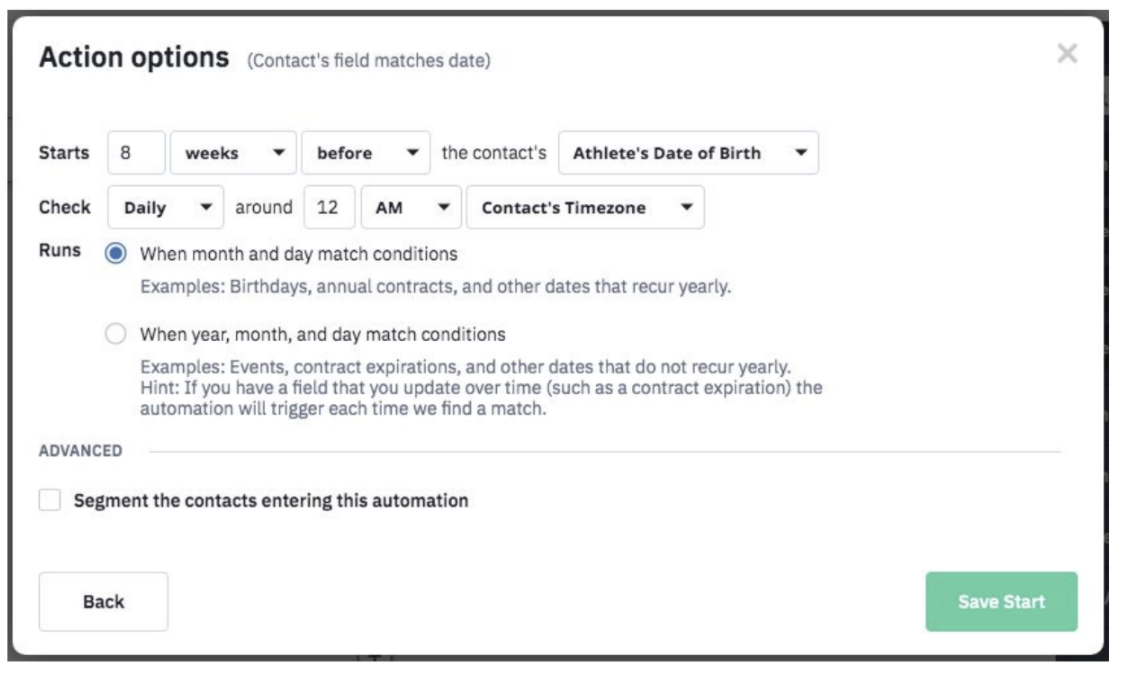
- Go to automations and click “Create Automation”. – Select Conditions and Workflow, and then Wait.
- Use the images to help you set up your for your entries. Note: This is a very delicate automation and will not fire off correctly unless the follow Action Options are correct.
- From there, you will create the following “road map” for your automation.
Note: The “Notify _______” light blue actions are used to let our front desk know it’s time to call someone about their upcoming birthday. If they click the link (as you see in the second light blue box), our front desk bumps them to the top of the list to call.
When you call, don’t mention that you know they clicked. That’s a little creepy. We just say, “We sent you an email a couple days ago about our birthday parties and wanted to know if you had a chance to look at it or if you had any questions!”
The “60 Days Out” email listed halfway through the automation is listed below.
Tips to make this email effective:
- Have you logo hyperlinked to your website’s home page. Maybe they’re not interested in a party, but they’re interested in classes.
- The percentage symbols in the subject line and greeting can be created by clicking “Personalize” and selecting “First Name.”
- Use bolded and colored text for the most important areas of your text. People are more likely to scan this email.
- Make your phone number clickable by highlighting the whole phone number, and hyperlinking it to the following “url” tel:YOURPHONENUMBER (no spaces.)
- Add a button at the bottom that hyperlinks directly to your birthday party page. This button is hyperlinked to the same place as you see in the dark gray “Does the contact match the following conditions?” box.